@Numpy
-Numerical Python의 약자
-파이썬의 고성능 과학 계산용 패키지
-Matrix와 Vector같은 Array 연산의 사실상 표준
-한글로 넘파이로 주로 통칭, 넘피/늄파이라고 부르기도 함
@Numpy 특징
-일반 List에 비해 빠르고, 메모리 효율적
-반복문 없이 데이터 배열에 대한 처리 지원
-선형대수와 관련된 다양한 기능 제공
-C, C++, 포트란 등의 언어와 통합 가능
*Python의 가장 큰 특징: Dynamic typing(동적 타이핑)
실행시점에 데이터 타입 결정
다양한 데이터 타입이 하나의 리스트에 들어가게 됨
but, numpy는 그걸 허락하지 않음
=> ndarray와 list의 가장 큰 특징 !!
@Array creation
-input
import numpy as np

test = np.array([1, 4, 5, 8], float)
print(test)
print(type(test[3]))
-output
[1. 4. 5. 8.]
<class 'numpy.float64'>
# Memory space occupied by one element is 64 bits
-numpy는 np.array 함수를 활용해 배열 생성 -> ndarray
-numpy는 하나의 데이터 type만 배열에 넣을 수 있음
-> list와 가장 큰 차이점, Dynamic typing not supported
-C의 Array 사용해 배열 생성(속도 빠름)
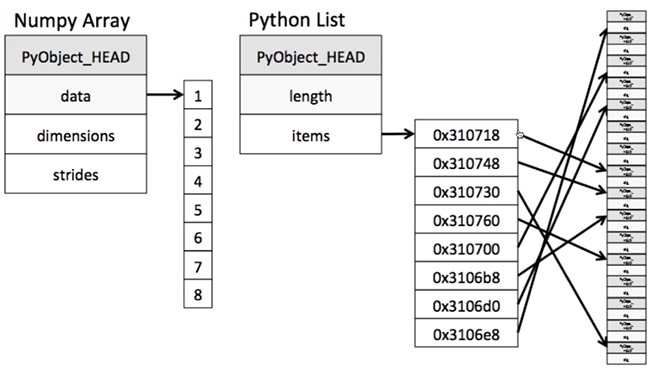
Python list는 list 안에 값이 아니라 메모리 주소가 들어감
copy하더라도 메모리 주소만 copy된다는 것(주소값을 그대로 가져오게 됨)
numpy는 차례대로 진행하기 때문에 Python list보다 속도가 훨씬 빠름
@shape
numpy array의 objest의 dimension 구성 반환
**array의 shape 크기는 항상 이해하면서 가야함!
@dtype
numpy array의 data type 반환
@Array shape - ndim & size
-ndim: number of dimension
-size: 전체 data의 개수
@reshape
-Array의 shape 크기 변경(element 갯수는 동일)

(2,4)의 2차원을 (8,)의 vector로 변경
보통 y=vector값으로 많이 들어오는데 sklearn은 matrix형태로 들어와야 함
-> 이때 reshape 호출해 변환
np.array(test_matrix).reshape(2,4).shape
#(2,4)

np.array(test_matrix).reshape(-1,4).shape
#(4,2)
-1: size를 기반으로 row 개수 선정
@flatten
-다차원 array를 1차원 array로 반환
@indexing
import numpy as np
test_exmaple = np.array([[1, 2, 3], [4.5, 5, 6]], int)
print(test_exmaple)
"""[[1 2 3]
   [4 5 6]]"""
print(test_exmaple[0][0])  # 1
print(test_exmaple[0,0])  # 1
-list와 달리 이차원 배열에서 [0,0]과 같은 표기법 제공
-matrix일 경우 앞은 row, 뒤는 column을 의미
@slicing: 데이터의 일부분 추출
**x:y:z에서 x는 시작지점, y는 끝나는 지점, z는 step
a = np.array([[1,2,3,4,5], [6,7,8,9,10]], int)
a[:,2:]  # 2 or more rows of all rows
a[1,1:3]  # Rows 1 to 2 of 1 row
a[1:3]  # Total of 1 row to 2 rows

-for문으로 데이터를 가져오지 않고도 slicing 이용해서 가져올 수 있음
-list와 달리 행과 열 부분을 나눠 slicing이 가능
-matrix의 부분 집합을 추출할 때 유용
@Creation Function
-list type을 그대로 가져오는 게 일반적
@arange
-array의 범위를 지정해, 값의 list를 생성하는 명령어
# arange: Same effect as range of list, Extract array from 0 to 29 as integer
np.arange(30)
"""[ 0  1  2  3  4  5  6  7  8  9 10 11 12 13 14 15 16 17 18 19 20 21 22 23
 24 25 26 27 28 29]"""
# Floating point can also be displayed
np.arange(0, 5, 0.5)
"""[0. 0.5 1. 1.5 2. 2.5 3. 3.5 4. 4.5]"""
@ones, zeros and empty
shape은 dimension의 구성이 어떻게 되는지.
-ones: 1로 가득찬 ndarray 생성
np.ones(shape, dtype, order)
np.ones(shape=(10,), dtype=np.int8)
"""[1 1 1 1 1 1 1 1 1 1]"""
np.ones((2,5))
"""[[1. 1. 1. 1. 1.]
[1. 1. 1. 1. 1.]]"""
-zeros: 0으로 가득찬 ndarray 생성
np.zeros(shape, dtype, order)
np.zeros(shape=(10,), dtype=np.int8)
"""[0 0 0 0 0 0 0 0 0 0]"""
np.zeros((2,5))
"""[[0. 0. 0. 0. 0.]
[0. 0. 0. 0. 0.]]"""
-empty: shape만 주어지고 비어있는 ndarray 생성
(memory 초기화가 되지 않음)
실무에서 자주 쓰이지 않음
*텐서플로우는 기본적으로 넘파이에 미분만 가능하게 해준 것
넘파이의 기본적 옵션들이 텐서플로우에 그대로 존재
@identity
-단위 행렬(i 행렬)을 생성함
n -> number of rows
np.identity(n=3, dtype=np.int8)
"""[[1 0 0]
   [0 1 0]
   [0 0 1]]"""
3x3인 전방행렬 만들어줌
@eye
-대각선이 1인 행렬, k값의 시작 index 변경 가능
np.eye(N=3, M=5, dtype=np.int8)
"""[[1 0 0 0 0]
   [0 1 0 0 0]
   [0 0 1 0 0]]"""
N, M 생략 가능
np.eye(3, 5, k=2)
"""[[0. 0. 1. 0. 0.]
   [0. 0. 0. 1. 0.]
   [0. 0. 0. 0. 1.]]"""
k -> start index (생략 가능)
@diag
-대각 행렬의 값 추출
matrix = np.arange(9).reshape(3, 3)
np.diag(matrix)
"""[0 4 8]"""
matrix = np.arange(9).reshape(3, 3)
np.diag(matrix, k=1)
"""[1, 5]"""k -> start index (생략 가능)
@random sampling
-데이터 분포에 따른 sampling으로 array 생성
-균등분포
np.random.uniform(0,1,10).reshape(2,5)
"""[[ 0.67406593,  0.71072857,  0.06963986,  0.09194939,  0.47293574],
       [ 0.13840676,  0.97410297,  0.60703044,  0.04002073,  0.08057727]]"""
-정규분포
np.random.normal(0,1,10).reshape(2,5)
"""[[ 1.02694847,  0.39354215,  0.63411928, -1.03639086, -1.76669162],
       [ 0.50628853, -1.42496802,  1.23288754,  1.26424168,  0.53718751]]"""
'CS > Python' 카테고리의 다른 글
| Numerical Python - Numpy(3) (0) | 2021.02.20 |
|---|---|
| Numerical Python - Numpy(2) (0) | 2021.02.20 |
| PCA: How to use in Python (0) | 2021.02.08 |
| Basic Linear Algebra | 선형대수 기본 (0) | 2021.01.18 |
| News Categorization (0) | 2021.01.18 |


